Figma to code: turn your designs into CSS, React, SwiftUI and more
How to go from a Figma design to working code without redlines or guesswork: Tuvi's Dev Mode generates code in seven formats — CSS, React, Tailwind, SwiftUI, UIKit, Compose, Android XML.
Veröffentlicht · Aktualisiert · 5 Min. Lesezeit
Every team that builds screens knows the ritual: the design is "done", and now a developer sits with the file on one monitor and the editor on the other, transcribing. Measure a margin, copy a hex code, squint at a font weight, repeat two hundred times. It is slow, and worse, it is lossy — the spacing that was a design token becomes a magic number, and three sprints later the app and the design disagree everywhere.
Going from Figma to code does not have to work like that. Here is the workflow where the numbers move themselves.
The problem with hand-off by ruler
Traditional hand-off gives developers pictures with annotations: screenshots, redlines, style-guide PDFs. All of them share one flaw — they are copies of the design, made by hand, and every manual copy drifts:
- redlines go stale the moment the design changes;
- eyeballed values ("that looks like 16px") accumulate into visible sloppiness;
- design tokens get flattened into hard-coded values that break on the next rebrand;
- and every ambiguity becomes a Slack interruption for the designer.
The fix is not better annotations. It is skipping the manual copy entirely and generating code from the design itself.
From .fig file to code in three steps
Tuvi opens Figma's .fig files
directly in the browser — no
plugin, no conversion, no export step. From there:
- Open the file and switch to Dev Mode. The design your team sees is the same document the developer inspects — one source of truth, not an exported snapshot.
- Select any element. Dev Mode shows its real values: measured distances to neighboring elements, padding, size, typography with family, size, weight, line height and letter spacing, fills with exact colors.
- Copy the code in your format. One click gives you the element expressed in the syntax your project uses, with every value taken from the design rather than estimated from pixels.
Because the values are read from the design, not re-measured by a human, the React padding and the SwiftUI padding are the same number — the one the designer chose.
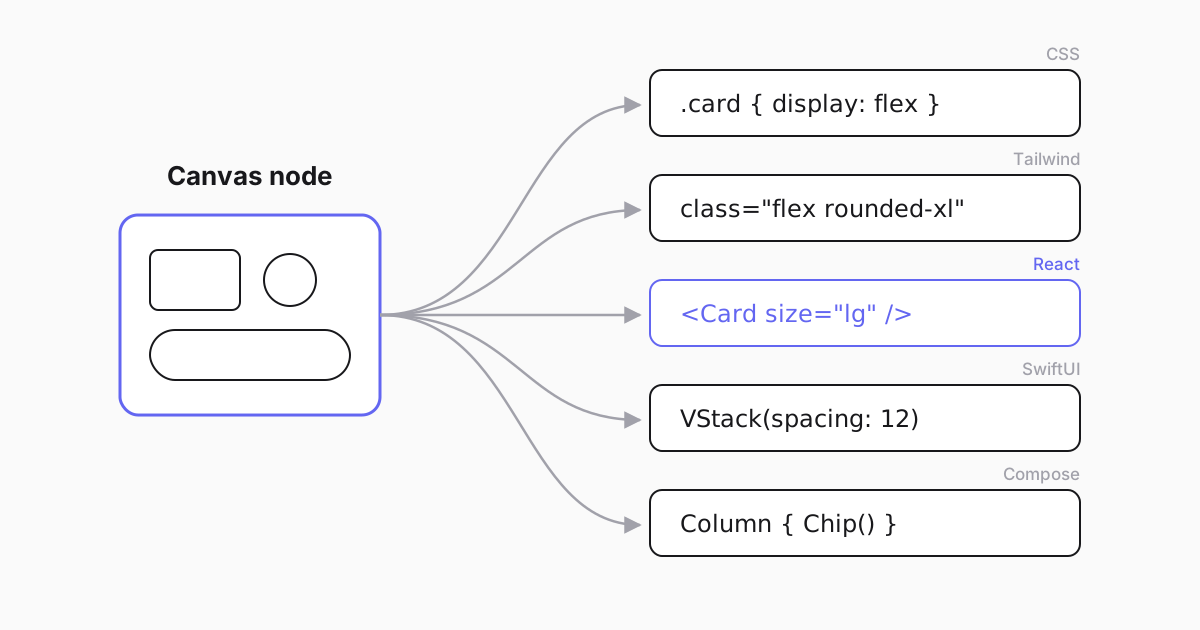
Seven formats, one design: pick your stack
Different teams ship to different platforms, so code generation speaks seven formats:
- CSS — layout, fills, borders, radii, shadows and typography as plain declarations, for any web stack.
- Tailwind — the same properties expressed as utility classes, ready for a Tailwind codebase.
- React — a component skeleton, in inline-style or Tailwind flavor.
- SwiftUI — declarative views for modern iOS and macOS work.
- UIKit — for teams maintaining classic iOS codebases.
- Jetpack Compose — composables for modern Android.
- Android XML — layouts for the older Android world.
The practical win is consistency across platforms: when web, iOS and Android all generate from the same design, cross-platform drift — the button that is subtly different in every app — stops at the source.
Alongside the per-element snippets, the ordinary exports are one click away too — PNG, JPEG, SVG or PDF for the assets that ship as assets — and a command-line tool (CLI) covers automation, so a pipeline can render frames to PNG without anyone opening the editor.
Tokens and variables: the rebrand insurance
The most expensive hand-off failure is invisible at first: a color that was a shared variable in the design lands in code as a hard-coded hex value. Everything looks right — until the brand refresh, when that value silently stays behind.
Dev Mode surfaces variables and shared styles as what they are: a color arrives labeled as its token, text carries its named style. Developers map design tokens to code constants once, and future design-system changes flow through instead of requiring an archaeology project.
The same discipline applies to typography and spacing: named text styles and shared variables come through with their names attached, so the code review question shifts from "is this the right value?" to "is this the right token?" — a question a reviewer can actually answer without opening the design.
Fitting it into your team's workflow
Code generation works best as the last step of a tight collaboration loop rather than a thrown-over-the-wall event:
- Designers mark finished frames Ready-for-Dev with annotations, so developers always know what is final and what is still moving.
- Developers join the file as free viewers — only editors need paid seats — inspect what they need, and copy code per element.
- Questions that remain become comments anchored to the exact element, visible to everyone, instead of private DMs. (More on this in our real-time collaboration guide.)
- Teams using AI coding assistants can go one step further: the same code generation is available to AI agents connected to the file, so "implement this card" becomes a grounded, checkable task.
An honest boundary
Generated code gives you correct values and sensible structure; it does not know your component library, your naming conventions or your state management. The productive workflow is: generate, paste, then adapt names and wire data — with the confidence that every number on screen came from the design, not from a ruler held up to a PNG.
That confidence is the actual product. Try it on a real screen: open your
.fig file, select the hardest component, and compare the generated values
with what your last hand-off actually shipped.
Sehen Sie Ihre eigenen Designs in Tuvi gerendert
Importieren Sie eine .fig-Datei im kostenlosen Plan und bearbeiten Sie noch heute gemeinsam.
Preise ansehenHäufig gestellte Fragen
How do I convert a Figma design to code?
Open the .fig file in Tuvi (no plugin or export step), switch to Dev Mode, select the element you need and copy the generated code in your format of choice — CSS, React, Tailwind, SwiftUI, UIKit, Jetpack Compose or Android XML.
Which code formats are supported?
Seven: plain CSS, React components, Tailwind classes, SwiftUI views, UIKit code, Jetpack Compose composables and Android XML layouts — covering web, iOS and both Android worlds from the same design.
Is the generated code production-ready?
Treat it as an accurate starting point: values, spacing and structure come from the real design, but naming, state and data wiring remain your job as an engineer. What it eliminates is the measuring and transcription work — and the errors that come with it.
Do I need a paid plan for code generation?
Yes — Dev Mode and code generation are part of the Professional ($12/editor/month) and Organization plans. Opening files, collaborating and viewing are available on the free Starter plan, and viewers never need a paid seat.