Letting AI agents read your designs — safely, over MCP
Tuvi's MCP integration lets AI agents list design files, inspect structure, read element properties, render previews and generate code — with your permissions in charge.
Pubblicato · 5 min di lettura
Most "AI + design" workflows today amount to pasting screenshots into a chat window. The model guesses at spacing, invents color values and cannot tell a component instance from a flattened group. The problem is not the model — it is the interface. Screenshots are lossy; design files are structured.
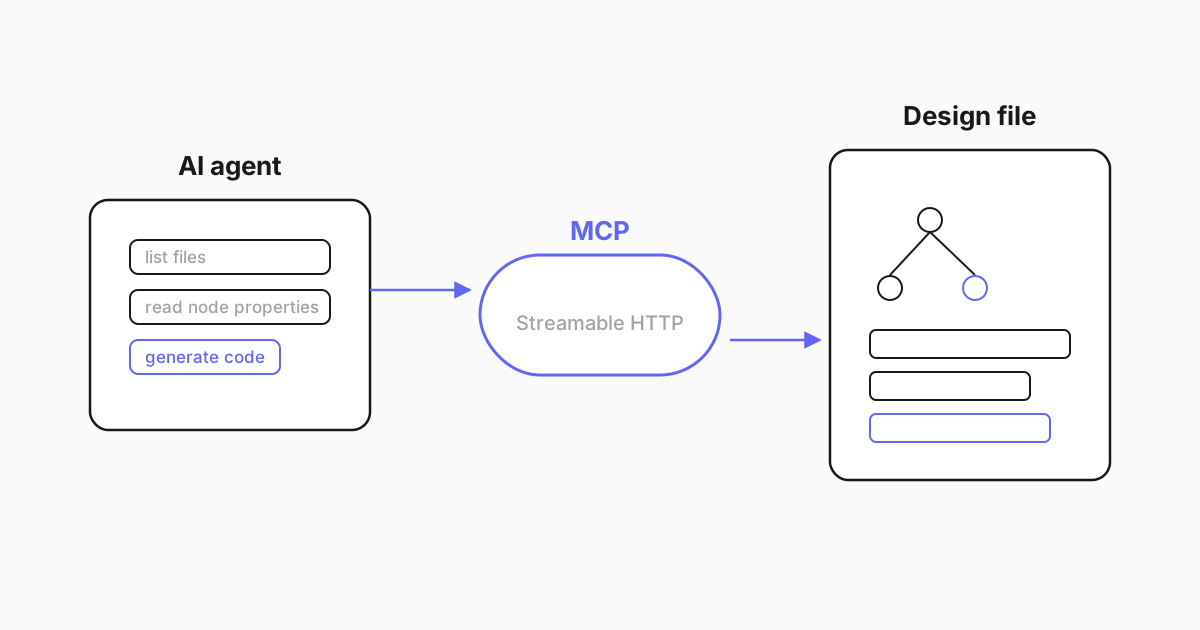
Structured access beats pixel guessing
Tuvi ships a built-in MCP integration — Model Context Protocol, the emerging standard for connecting AI assistants to tools. Point a compatible client at it and the agent gains a small, explicit toolset:
- list files available to the connected account;
- read document structure — the actual tree of pages, frames, components and layers, not a rasterized impression of it;
- read element properties — layout values, fills, typography, component relationships;
- render to PNG — when the agent needs visual grounding, it can request a true render of a frame, the same image users see in the editor;
- generate code — the Dev Mode generator, callable programmatically, in all seven supported formats from CSS and Tailwind to SwiftUI and Compose.
With that toolset, "implement this card component" becomes a grounded task: the agent reads the card's real padding and tokens, renders it to check its understanding, generates a starting implementation and adapts it to your codebase conventions.
Safety is a permission model, not a promise
Giving software agency over your files raises a fair question: what exactly can it touch? Three properties define the answer.
- The agent is an account. MCP access sits behind the same authentication as every other client. An agent connects on behalf of an account, and file access follows that account's permissions. There is no side door where "the AI" sees more than the person who configured it.
- The surface is read-and-generate. The toolset is deliberately narrow and read-oriented: structure, properties, renders, code. It does not mutate documents, so an over-eager agent cannot rewrite your design system on a Friday night.
- Revocation is ordinary. End the account's session and the agent's access ends with it — the same lifecycle as any credentialed integration.
This matters for teams with client work under NDA: enabling AI tooling does not mean opening the vault. You decide which account the agent uses, and its reach ends where that account's reach ends. The sane default is a dedicated account scoped to the projects the agent genuinely needs — least privilege, as with any integration.
What this unlocks in practice
Three workflows we see becoming routine:
- Design review by agent — list changed frames, read their structure and flag inconsistencies against the design system's tokens: hard-coded colors that should be variables, spacing that drifts from the scale, text that dodged the shared styles.
- Grounded implementation — coding assistants that pull real values from the file instead of asking the developer to alt-tab and measure. Padding arrives as the number the designer set; colors arrive as tokens.
- Documentation generation — walking a component set and producing usage docs with rendered previews, straight from the source of truth instead of screenshots that were stale the day they were taken.
If you want the team-workflow view of these scenarios — who sets it up, what changes for designers, how to pilot it in a week — we wrote a separate practical guide to AI assistants for design files. This post is the shorter answer for the engineer evaluating the surface itself.
Evaluating it like an engineer
If you are assessing this surface for adoption, three checks separate a real evaluation from a demo:
- Ground truth test. Connect an agent to a file you know well and ask for values you can verify — the padding of a specific card, the token behind a background color. Correct answers here are the whole premise.
- Permission test. Ask the agent to list files, then compare against what its account sees in the web app. The lists must match exactly.
- Render test. Request a preview of a frame and compare it with the editor. What the agent "sees" should be what your team sees.
Ten minutes, no trust required — every claim in this post is checkable against your own file.
Why structure wins
A recurring objection: "models are getting better at reading screenshots — won't this stop mattering?" Vision models improve, but the gap is categorical, not incremental. A screenshot cannot tell an agent that two buttons are instances of the same component, that a color is a token with a name and a mode, or that a frame reflows because of layout rules rather than coincidence. Those facts are not in the pixels; they are in the file.
Reading the file also composes with the rest of the toolchain. The same account that lets an agent read structure lets your developers inspect and export code by hand, and both consume the design the team actually edits — one source of truth, no export pipeline drifting quietly out of date.
The design file has always been a database. MCP finally gives well-behaved robots a key — your key, with your locks still on the doors. Plans and what each includes are on the pricing page; the fastest evaluation is connecting an agent to one real file and asking it for the padding you already know.
Guardate i vostri design in Tuvi
Importate un file .fig con il piano gratuito e modificate insieme già oggi.
Vedi i prezziDomande frequenti
What is MCP in one sentence?
MCP (Model Context Protocol) is an open standard that lets AI assistants use well-defined tools on external systems — in Tuvi's case, tools for reading and rendering design documents.
Can an agent see files it was not given access to?
No. MCP access goes through the same authentication and file permissions as the web app; an agent acts on behalf of an account and sees only what that account can see.
What can an agent actually do with a design?
List available files, read the document structure, fetch properties of specific elements, render a frame to PNG for visual grounding, and request generated code in the seven supported formats. It cannot modify documents.
Is this available on the free plan?
The MCP integration is part of Tuvi's developer tooling; code generation it exposes belongs to Dev Mode on the paid plans. Check the pricing page for the current breakdown per plan.